
Every zone, one list.
Status, plan and a 24-hour sparkline for each domain. Paused zones and pending certificates are flagged before they bite.
Cloudflare, one click from your menu bar
Domains, DNS, traffic, cache, R2, Workers and Tunnels for every zone on your account. Live in a popover the size of a postcard.
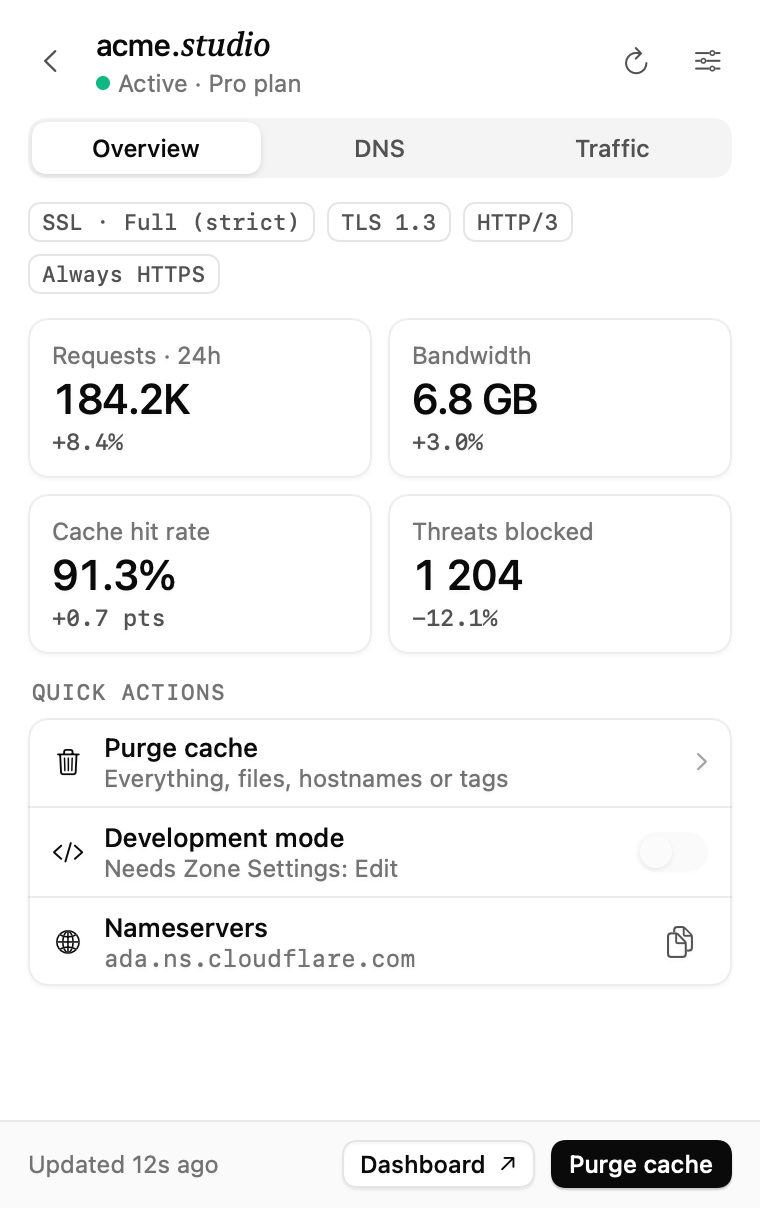
Click the cloud. Pick a domain. Everything the dashboard shows you first is already there.
Requests, bandwidth, cache hit rate and threats blocked, each compared with the day before. SSL mode, TLS 1.3 and HTTP/3 sit on top so a wrong setting never hides.
The things you check every day, minus the login, the tabs and the loading spinners.
Status, plan and a 24-hour sparkline for each domain. Paused zones and pending certificates are flagged before they bite.
Cached versus uncached requests for every zone, compared with the day before.
Requests over 24 hours, 7 or 30 days, with visitors, errors and top countries.
Click a row to copy it. Unproxied records get a warning.
Everything, URLs, hostnames or tags, with a confirm step.
Storage and operations against the free limits, plus a bucket browser.
Requests, p50 latency and error rate per Worker. Anything over 1% is flagged.
Every open, and every 1 to 15 minutes.
Cfbar works with one Cloudflare API token you create. Give it read access and it can't change a thing. Add cache purge if you want the one button that writes.
Token
Network
Writes
Seven days free, everything unlocked. Buy a license when you're sure.
7-day free trial
Not sure yet? Start the free trial.
A Cloudflare API token with read access to your zones, DNS, analytics, R2 and Workers. Add Zone · Cache Purge · Purge only if you want to purge from the menu bar. Cfbar walks you through creating it on first launch.
No. Purging the cache is the only write action, and it only works if your token allows it. Everything else is read-only.
Straight to api.cloudflare.com from your Mac. The token lives in the macOS Keychain. The only other request Cfbar makes is to check your trial or license.
Every time you open the popover, plus on a schedule you pick between 1 and 15 minutes. Right-click the cloud icon to refresh by hand.
Cfbar asks for a license key. Your token and settings stay exactly where they were, so you pick up where you left off.
Yes. Deactivate it in Cfbar's settings on the old Mac and enter the key on the new one.
Cfbar lives in your menu bar. Seven days free, no card needed.
Download for macOSRequires macOS 15 Sequoia or later